Showing posts with label digital manipulation. Show all posts

Tuesday, 19 November 2013

Digital Manipulation Research: Ben Heine

http://benheine.deviantart.com/
http://www.benheine.com/
http://benjaminheine.blogspot.co.uk/

Quick Links: 
Projects
Exhibitions
Biography
Contact
Shop

I was really interested by Ben's graphic work as I thought the dots/popart idea was really effective and would be so fun to have a go of. Below are some of my favourite digital images of his.


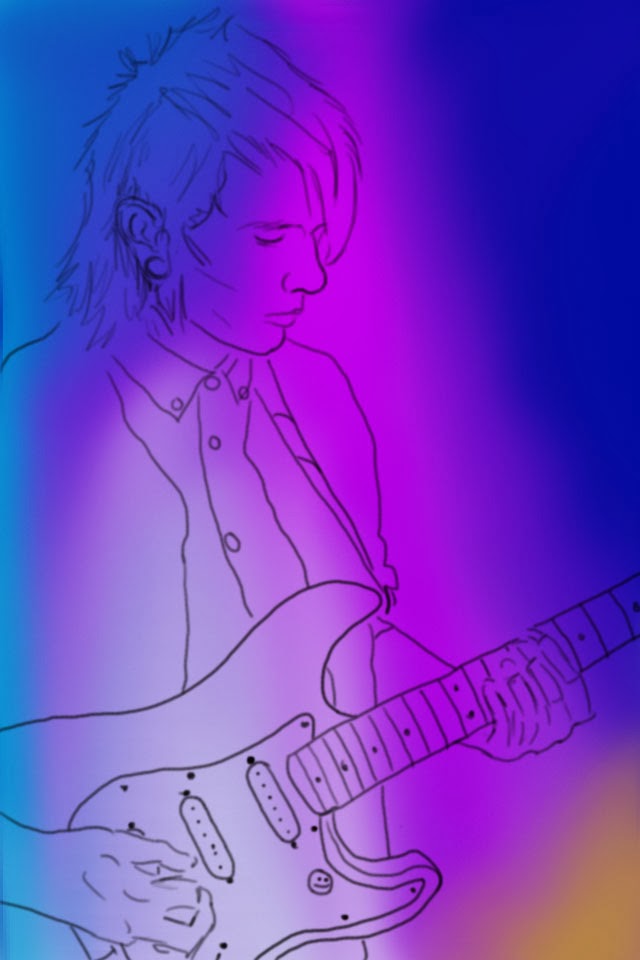
Digital Manipulation: Person

I started out with the outline of the image in black.
I then created a new layer and coloured the background with a round spray brush. I found this brush worked best because the edges of the connecting colours blend together.
I used a flat curve brush to create the hair. I think this brush was good to use because it created texture.
I found it very difficult to get the face proportions right on the face so what I did was I used the stamp tool to just copy the basic outlines of the facial features and then I used the mixer brush and a normal brush to create the shadows using blues and purples. 
For the hands I did the same technique as above and used a small round brush to create the shadows and hand texture.
The guitar neck was the most difficult part. I used the colour dropper tool to pick up the actual colours off of the photograph and used them as a mixture to create light and dark spaces. to me the strings seemed pretty much impossible to do by hand so I used the stamp tool to create those.
I think the guitar was pretty easy to do. I basically used the mixer tool to blend a light blue and a turquoise colour to create a gradient and I like how it turned out. 
Add caption
I added highlights to the guitar body and used the dropper tool to pick the colour of the pick guard and filled that in. I also added the black outline and used a circle brush to create the screws.
I used the circle tool to make the smilie face and used yellow, light yellow and a darker yellow  to colour it.
For the coat I basically just picked the colours off the original image and blended them together to create shadows and light areas. For the strap of the guitar I I used black and then just blotches of colour for the patches.
The shirt was the most difficult part at the point. I could not get the squares in the correct place so I used the stamp tool to copy the outlines and then spent a lot of time picking every individual colour and colouring each square. I also took off the outline and I think it works really well and I am very proud of how it has turned out. 
The image I have drew from is not my own work. It is the photography of Chas Stoddard.

Friday, 15 November 2013

Digital Manipulation: Dog

My last image I drew was an image of my dog. For the outline I just used the black paint brush. I started off with the ears and I used a range of browns and oranges to create the colour of the fur. To do the fur I used a brush called 'flat curve' which gave the effect of fur which I thought was really convenient. I used a normal round brush to draw the eyes and I used brown, black and white for highlights. 


It took me a while to get the nose right because I didn't feel it looked right but I got there in the end and even added a filter to it so that it looked textured. I think it worked really well and I am happy with the outcome. 


When I was colouring the body i found it quite difficult to create the fur because the brush was only one direction but I made the best of what I had and I am pleased with how it turned out.


When I finished I just added a grey background and a small shadow just to finish off the image. This is by far my favourite digital drawing because I think it is the most realistic and I spent the most time on this one.

Thursday, 14 November 2013

Digital Manipulation: Turtle

My third image I created is of a turtle that i previously drew and scanned in and like the others I traced the outline and then deleted the image so I was left with the black outline.  
I kept forgetting to screen shot but for this I basically used the brush tools to create the shell texture, which I don't think is very good, and to created the scales. 
I wanted to add a texture to the leg and neck so I used the same filter as the elephant and i think it looks a bit better.  
When I had finished I added a grass background using a grass like brush tool and I really like the effect it gives but I am not too keen on the whole image itself. 

Digital Manipulation: Elephant

This is the second image that I drew and to do this I scanned in an image of an elephant that I already drew and then used the brush tool to trace over the image. I forgot to take screen shots before this point but I used the brush tool and the mixer brush tool to create the wrinkles and detail on the elephants face and ears. I like how the lines turned out but I think it is too much detail. I think it would have looked better if there were less lines. I added a mosaic filter to the image to add texture to the skin. Also I don't really like the ears because they don't actually look like they are attached to his head. 
Next I aded a background using the brush and mixer brush tools. I used the colour green because I think the colour works really well with the grey of the elephant. 
When I finished and looked at the final image I didn't really like it but I used the rubber tool and rubbed out some parts of the filter just to break it up and little and I think it looks a little bit better. 


Digital Manipulation: Octopus

This is the first digital image I created of an octopus and to do this I opened a sketch I drew of an octopus and traced the outline. I then removed the scanned image so I was just left with the black outline 
I stuck to one shape brush on this image because it was my first time using a Cintiq so I just wanted to keep it simple for my first try. I used a light orange as a base colour so that I could work over the top with darker colours. I really like the tones I have managed to create with the colours I used and I also like some of the sketchy lines around the head area.
When I finished colouring the octopus I wanted to add a background so  I created a new layer and put it behind the octopus and used a range of blues and used the 'mixer brush' tool to merge the colours together. I really like ow this has turned out, especially because it was my first time drawing graphically.

Wednesday, 13 November 2013

Digital Manipulation Research: Alexander Jansson

http://www.alexanderjansson.com/
http://alexanderjansson.deviantart.com/

Quick Links:
Illustrations
Animation
Characters
Blog
Biography

I really like the animals that Alexander Jansson draws in his work. I think they are really impressive and I like the techniques he uses. His drawings look realistic yet cartoon-like and I think it works really well.


Digital Manipulation Research

http://misanthropics.deviantart.com (first image)


I am not entirely sure of the artists of these images but when I searched for digital animal drawings I found this really interesting style of digital drawing and I was very inspired by it. I would like to try this for myself and see how it turns out.

Digital Manipulation Research

For my digital project I decided I would like to base my images around animals. I enjoyed the animals and creatures project beforehand and I am really interested in drawing digital animals.

http://junryou-na-kokoro.deviantart.com
I really like the colours and techniques used in this image.
I prefer realistic digital drawings but I thought this was really
unusual and inspiring.


http://komodoempire.deviantart.com
I like this because it is quite a realistic drawing
and I am inspired by the use of textured
lines to create the fur.


http://elconsigliere.deviantart.com
I really like the colours and textured lines
used in this drawing. I think they make
the image look realistic and the background
also adds to the effect.